Generuj raporty i arkusze
Używając przycisku Arkusze raportu, użytkownik może ponownie wygenerować arkusze, raport i wykresy dla obliczonej lokalizacji. Arkusze są zawsze generowane zgodnie z konfiguracją wyników.
Okno dialogowe opcji raportu
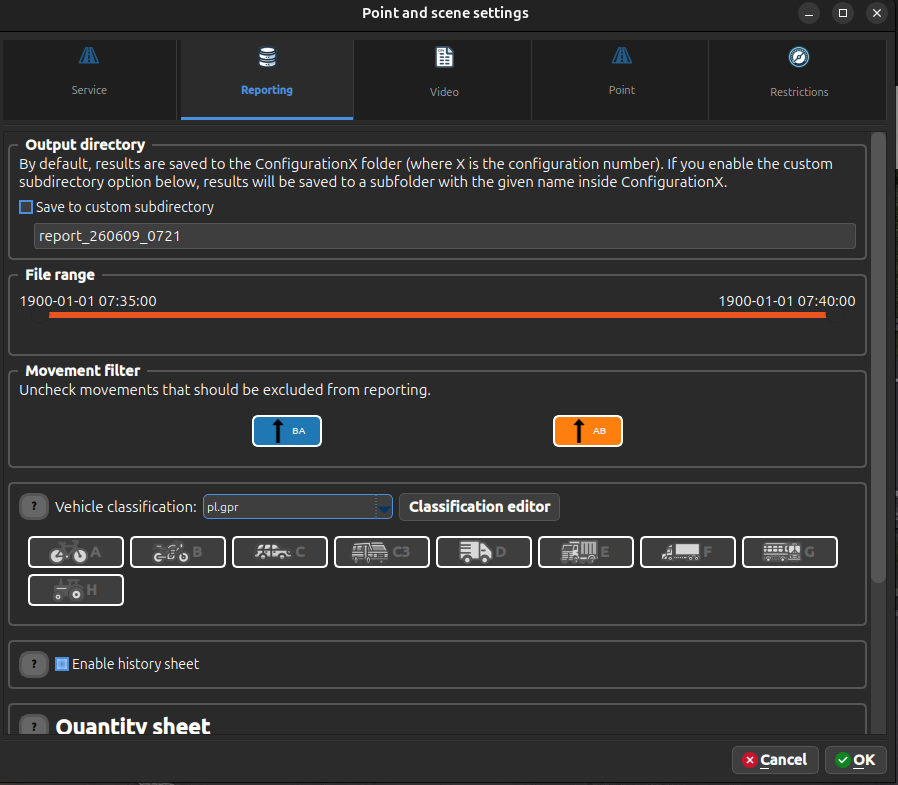
Kiedy klikniesz przycisk "Arkusze raportu", pojawia się okno dialogowe pozwalające na skonfigurowanie wszystkich opcji raportowania przed wygenerowaniem raportu. To okno dialogowe zapewnia scentralizowaną kontrolę nad tym, jakie dane są uwzględniane i jak są formatowane.
Zakres czasu raportu
Okno dialogowe zawiera suwak zakresu czasu z krokiem 5 minut:
- Użyj lewego uchwytu, aby ustawić początek zakresu.
- Użyj prawego uchwytu, aby ustawić koniec zakresu.
- Uwzględniane są zdarzenia z wybranego przedziału czasu, niezależnie od granic plików nagrań.
Filtr działa na źródłowej osi czasu przed zastosowaniem opcjonalnego przesunięcia Czas raportowanego pomiaru. Suwak wybiera zakres z dokładnością do 5 minut, a opcja Grupowanie ilościowe ustala okres agregacji wyników.
Filtr relacji
Okno dialogowe zawiera również Filtr relacji. Odznacz wszelkie relacje, które nie powinny być uwzględniane w wygenerowanych raportach.
- Sekcje raportu oparte na historii, prędkości, ALPR i CO2 wykluczają trackery zawierające odznaczoną relację.
- Arkusze ilościowe najpierw dzielą wiersze trackerów wielorelacyjnych, dzięki czemu zaznaczona relacja może pozostać liczona, a odznaczone relacje są pomijane.
- Pozostawienie wszystkich relacji zaznaczonych jest takie samo jak nieużywanie filtru relacji.
Dostępne opcje
Okno dialogowe opcji raportu pozwala na konfigurowanie:
| Opcja | Opis |
|---|---|
| Klasyfikacja pojazdu | Wybierz metodę klasyfikacji (GPR, Euro-6, SCPR, itp.) |
| Arkusz historii | Włącz/wyłącz generowanie pełnej historii trackerów |
| Filtr relacji | Uwzględnij lub wyklucz wybrane relacje z wygenerowanych raportów |
| Czas raportowanego pomiaru | Opcjonalnie ustaw czas rozpoczęcia raportu, od którego zaczynają się czasy wyłącznie w wygenerowanym raporcie |
| Grupowanie ilościowe | Ustaw okres czasu do grupowania wyników (domyślnie 5 minut; dostępne także 10, 15, 20, 30, 60 lub 120 minut) |
| Główna kategoria | Wybierz kategorię podstawową dla arkuszy ilościowych |
| Układ arkusza | Wybierz spośród różnych formatów wyjścia |
| Arkusz prędkości | Włącz/wyłącz wyniki pomiaru prędkości |
| Arkusz ALPR | Włącz/wyłącz wyniki rozpoznania tablic rejestracyjnych |
Po kliknięciu OK, wszystkie ustawienia są zapisywane w konfiguracji i rozpoczyna się generowanie raportu z wybranymi opcjami.
Grupowanie czasowe działa również dla nagrań bez daty rozpoznanej z nazwy oraz dla nagrań krótszych niż pojedynczy okres grupowania. Przedział zawierający poprawne zdarzenie jest zawsze zachowywany. Granice plików nagrań nie rozdzielają grup: nagrania przypadające na ten sam interwał są sumowane w jednym koszyku.
Opcjonalnie ustawiony czas rozpoczęcia raportu (Czas raportowanego pomiaru) przesuwa w generowanych raportach czasy wyników,
lokacji i plików o tę samą wartość. Nie modyfikuje danych źródłowych ani czasu pokazywanego podczas
odtwarzania, na liście plików i w widoku trackerów. Suwak zakresu raportu także pozostaje na
kanonicznej osi źródłowej: najpierw wybiera dane, a dopiero potem ich kopie są przesuwane do eksportu.
Bez ustawionego czasu rozpoczęcia raport używa czasu kanonicznego; dane bez daty mogą więc pozostać na osi 1900-01-01.
Typy wyjścia - Historia
History.csv- arkusz z pełną historią wszystkich obiektów (poprawnych i niepoprawnych) oraz parametrami określonymi dla każdego trackera. Każdy przejazd zajmuje jeden wiersz. Tracker zliczony na wielu relacjach jest dzielony na podrekordy połączone przezTUID, zsubtuidnumerowanym od 0.
Kolumna is_counted określa, czy wiersz uczestniczy w raporcie ilościowym. validation_reason zawiera stabilny kod statusu walidacji:
Validated |
validation_reason |
is_counted |
|---|---|---|
| 0 | Unknown |
false |
| 1 | Validated |
true |
| 2 | AreaUncounted |
false |
| 3 | RelationUncounted |
false |
| 4 | CrosssectionUncounted |
false |
| 5 | Cargo |
false |
| 6 | LabelUncounted |
false |
| 7 | ValidatedMerged |
true |
| 8 | MultiValidated |
true |
| 9 | MergedUncounted |
false |
| 255 | Invalid |
false |
Typy danych wyjścia - Ilość
Quantity.csv/xlsx- arkusz z danymi wyników liczenia ilościowego. Zobacz układy arkusza ilościowego.*.png- wykresy ilościowe, w tym kołowa struktura kategorii i relacji wraz z godzinową zmianą ich udziałów oraz profil dobowy z PHF liczonym co 15 minut z surowych danych 5-minutowych,Report.docx- fragment raportu dotyczący wyników ilościowych, obserwacji lub oszacowania ruchu dobowego i godzin szczytu. Tabela szczytów zawiera również PHF; wartości bliższe 1 oznaczają bardziej równomierny ruch pojazdów w czterech kwadransach godziny.
Zakresy analiz w raporcie
Główne kartogramy, struktury, profil dobowy, PHF i godziny szczytu obejmują wyłącznie pojazdy
drogowe na relacjach typu Road. Mikromobilność na jezdni jest prezentowana osobno. Uczestnicy
przejść są zliczani wyłącznie na relacjach typu Crosswalks, z osobnym wynikiem dla pieszych,
rowerów, UTO i hulajnóg oraz z podaniem sumy.
Profile do prognoz ruchu rozdzielają dni robocze i weekendy. Dni robocze mają profil poranny i popołudniowy. Weekend korzysta z jawnie skonfigurowanego trybu jednego szczytu dziennego albo szczytu porannego i popołudniowego. Każdy profil zawiera strukturę kierunkową oraz strukturę rodzajową dla każdego kierunku według aktywnej klasyfikacji.
Raport rozróżnia liczbę pojazdów w okresie pomiaru, ruch zaobserwowany w pełnej dobie, średnią z kilku pełnych dób oraz oszacowanie dobowe z pomiaru 16-godzinnego. Wynik nie jest nazywany SDRR bez jawnej metodyki rocznej i kompletu wymaganych danych. Dla skrzyżowania suma przejazdów nie jest automatycznie przedstawiana jako ruch dobowy jednego przekroju drogi.
Jeżeli czas pomiaru nie pozwala wyznaczyć wyniku dobowego, raport pokazuje liczbę pojazdów
zaobserwowanych w dokładnym okresie pomiaru. Nie przedstawia sztucznego ADT = 0 ani zestawień ADT
dla relacji i przejść.
Początek raportu pokazuje w jednym wierszu datę, godziny i czas trwania pomiaru. Dla materiałów bez
daty pomijana jest techniczna wartość 1900-01-01. Następnie raport zestawia oznaczone ikonami
łączne liczby pojazdów, pieszych i rowerzystów. Osobna tabela pokazuje liczbę i procentowy udział
pojazdów lekkich oraz ciężkich, a kolejne zestawienie liczbę autobusów i mikrobusów oraz ich udział
w ruchu drogowym. Mikrobusy pozostają częścią grupy lekkiej, więc obu zestawień nie należy sumować.
Dane pochodzą z surowych klas AI i właściwych typów relacji, niezależnie od klasyfikacji arkusza.
Dobowy wykres ruchu wyróżnia najbardziej obciążone 60 minut w trzech porach dnia: szczycie porannym
(06:00–10:00), międzyszczycie (10:00–15:00) i szczycie popołudniowym (15:00–19:00). Każda godzina
jest wyznaczana jako najbardziej obciążone cztery kolejne, kompletne interwały 15-minutowe w danym
oknie. Każdy 15-minutowy słupek pokazuje ruch zsumowany ze wszystkich relacji drogowych. Pod profilem
znajduje się niższy panel PHF korzystający z tej samej osi czasu. Godziny są podpisane pod oboma
panelami, a każdy kolorowy zakres szczytu ma bezpośrednio nad sobą etykietę z godzinami i sumą ruchu;
wykres nie używa osobnej legendy. Sekcja „Godziny szczytu” w Report.docx przedstawia tabelę z
dokładnym początkiem i końcem każdej godziny oraz liczbą pojazdów, rowerzystów i wartością PHF. Godzina jest wybierana na
podstawie ruchu pokazywanego na dobowym wykresie, natomiast liczby uczestników są wyznaczane niezależnie
od wybranej klasyfikacji raportowej — bezpośrednio z bazowych klas AI w QuantityRaw. Brak kompletnej,
dodatniej godziny w danym okresie jest oznaczany myślnikiem; raport nie wyznacza osobnych szczytów
dla poszczególnych relacji.
Osobny godzinny wykres natężenia pokazuje obok siebie pojazdy, pieszych i rowerzystów. Dzięki temu porównuje grupy uczestników ruchu bez uzależnienia ich widoczności od klasyfikacji wybranej dla arkusza.
Pod tabelą raport umieszcza dodatkowe kartogramy relacji dla każdej formalnie wykrytej godziny: szczytu porannego, międzyszczytu i szczytu popołudniowego. Każdy kartogram obejmuje dokładnie godzinę podaną w tabeli i korzysta z bazowych klas AI, niezależnie od wybranej klasyfikacji raportowej. Jeżeli dla danego okresu nie wykryto kompletnej dodatniej godziny, odpowiadający mu kartogram nie jest tworzony. Dobowy kartogram całego pomiaru pozostaje dostępny w wynikach i w ogólnej sekcji wykresów.
Raport umieszcza jeden pod drugim dwa wykresy pierścieniowe. Wykres struktury rodzajowej przedstawia udział każdej zarejestrowanej kategorii; łączna liczba pojazdów znajduje się w środku, a legenda zachowuje kolejność klasyfikacji i podaje procentowy udział każdej kategorii, także dla wartości poniżej 1%. Wykres struktury relacji pokazuje procentowy udział ruchu wjazdowego bezpośrednio na pierścieniu, a w legendzie podaje nazwy relacji z konfiguracji oraz liczby pojazdów. Kolory kategorii i relacji odpowiadają kolorom tych samych serii na właściwych wykresach godzinowych. Pod każdym wykresem pierścieniowym znajduje się niski wykres godzinowy struktury w ciągu dnia. Każdy niepusty słupek ma wysokość 100% i pokazuje procentowy udział kategorii albo relacji, natomiast liczba nad nim podaje rzeczywisty łączny ruch w danej godzinie. Pozwala to porównywać skład ruchu niezależnie od zmian całkowitego natężenia.
Bezpośrednio pod parą wykresów kategorii raport wymienia liczbę i procentowy udział każdej kategorii aktywnej klasyfikacji. Pod parą wykresów relacji analogiczne zestawienie podaje rzeczywistą liczbę uczestników ruchu oraz udział dla każdej relacji drogowej. Są to zliczenia z wybranego czasu pomiaru, a nie wartości ADT.
Pod pełnym kartogramem ruchu raport dodaje tabelę struktury rodzajowej na wlotach. Wiersze odpowiadają wlotom skonfigurowanym dla arkuszy, natomiast kolumny kategoriom aktywnej klasyfikacji. Wartości są sumą całego zmierzonego ruchu na relacjach rozpoczynających się na danym wlocie; wlot bez ruchu pozostaje widoczny z wartościami zerowymi. Szerokie tabele używają pionowych, skróconych nagłówków kategorii: dla etykiety zawierającej kropkę pokazywana jest część przed pierwszą kropką, a etykieta bez kropki pozostaje bez zmian. Kolejność kategorii nadal wynika z aktywnej klasyfikacji.
Analogiczna tabela znajduje się bezpośrednio pod każdym wygenerowanym kartogramem szczytowym.
Obejmuje wyłącznie dokładną, półotwartą godzinę [od, do) pokazaną w tabeli szczytów i na podpisie
kartogramu. Dzięki temu struktura kategorii na wlotach dotyczy dokładnie tego samego ruchu co dany
kartogram.
Układy arkusza ilościowego
Aktualnie obsługiwane układy to:
Csv- płaskie wyjście CSV.XlsxEntrances- jeden skoroszytQuantity.xlsxz jednym arkuszem na wejście.XlsxEntrancesHorizontal- jeden skoroszytQuantity.xlsxz jednym arkuszem na wejście i poziomymi tabelami relacji.XlsxEntrancesVertical- skoroszytQuantity.xlsxz pionowo ułożonymi tabelami standardu GPR dla kolejnych interwałów 15-minutowych. Tabele grupują relacje według wlotu i manewru (Zaw,L,P,W), podają pieszych osobno dla każdego wlotu oraz tabelę zbiorczą dla automatycznie wybranej godziny szczytu (cztery kolejne interwały).XlsxTrafficUSA- skoroszytQuantity.xlsxz czterema zwartymi tabelami: wszystkie pojazdy, pojazdy ciężkie, autobusy i piesi. Kolumny pojazdów są grupowane według wlotu i manewru, a kolumny pieszych zawierają jedną sumę na wlot, bez metadanych lokalizacji i godzin szczytu.
Dla konfiguracji skrzyżowań, które zawierają przejścia dla pieszych, układy XlsxEntrances i
XlsxEntrancesHorizontal również dodają dedykowane arkusze przejść na końcu Quantity.xlsx
(jeden arkusz na przejście).
Ty tuł arkusza przejścia używa konfigurowalnego prefiksu (na przykład tłumaczonego w interfejsie), a następnie identyfikator przejścia.
Typy wyjścia - Prędkość
Velocity.csv- arkusz z historią każdego pojazdu i zmierzoną prędkością ruchu.Velocity.xlsx- osobny arkusz dla każdej relacji, z wierszami czasu zgodnymi z okresem grupowania raportu i kolumnami przedziałów prędkości. Przedziały mają szerokość 10 km/h albo 5 mph. Każdy arkusz zawiera sumy wierszy i kolumn, udział pojazdów w każdym przedziale oraz wartości V50, V85 i V95.*.png- wykresy prędkości (rozrzutu) i średniej prędkości,Report.docx- fragment raportu jest dodawany dotyczący wyników prędkości, średniej prędkości w zależności od "kategorii grupowania", naruszeń limitów, dokładności i poprawności liczenia.
Typy danych wyjścia - ALPR
Alpr0to500.xlsx,Alpr500to1000.xlsx, ... - stronicowane arkusze z historią pojazdów, odczytanymi tablicami oraz zdjęciami pojazdów i tablic.*.png- wykres dokładności pomiaru ALPR i statystyka kodów liter i krajów,Report.docx- fragment raportu dotyczący wyników ALPR, dokładności pomiaru, kodów liter i krajów jest dodawany,